Change the destination.
Update a dynamic QR destination after printing. Keep the same code on your packaging, signage or next campaign.
Make a printed moment the beginning of something more. Create branded QR codes, keep dynamic destinations flexible, and bring every connection into one workspace.
Update a dynamic QR destination after printing. Keep the same code on your packaging, signage or next campaign.
Bring your colours, patterns, frames and artwork into the design, with options available for your plan.
Eligible paid plans add scan history, device breakdowns and campaign analytics to help you understand engagement.
Organise your codes, short links and link pages in shared workspaces with plan-based team access.
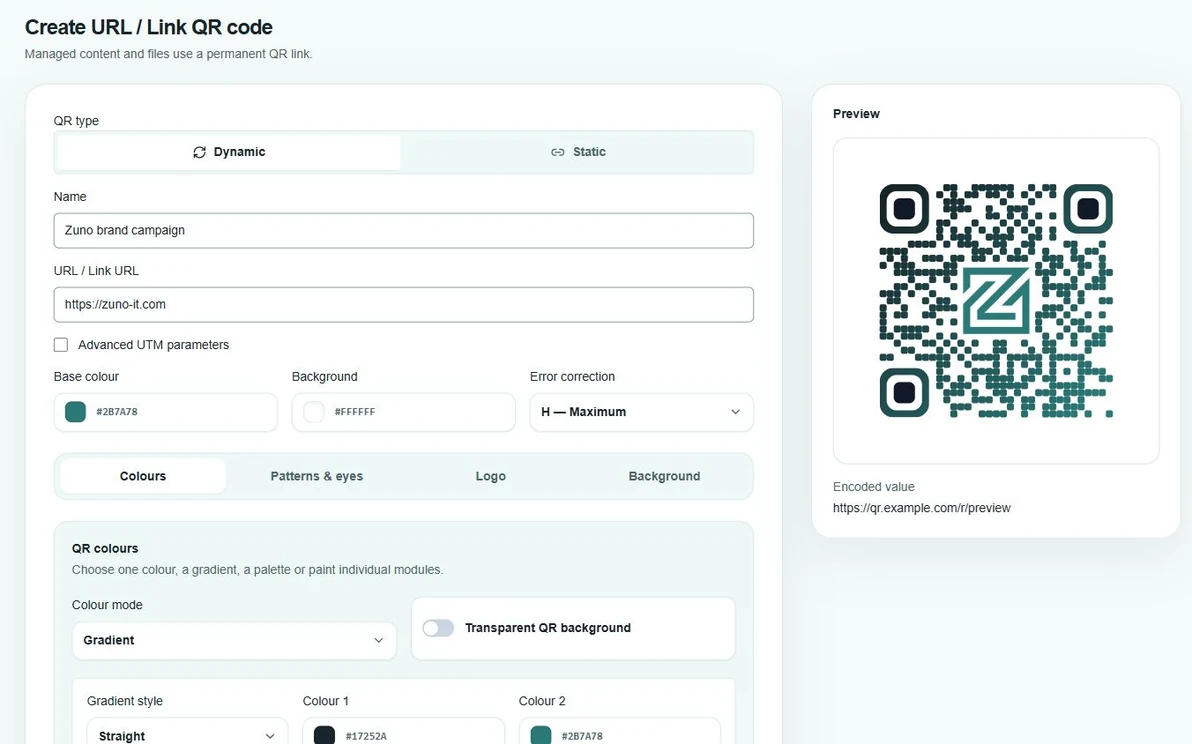
Choose your content, adjust the colours and styling, and check the live preview before creating your QR code. Design options depend on your plan.
Start with a free static URL code, or use a dynamic code for a destination you can update later.
Customise the design, check the preview and test a scan before you send it to print.
Download your QR code. Manage dynamic destinations and supported insights from your workspace.
A static QR stores its content directly in the code. A dynamic QR points through a managed redirect, so you can change its destination without printing a new code.
Yes. The free static designer lets you create and download a URL QR code in your browser. Available design options depend on access and plan.
Features and limits vary by plan. Check pricing for dynamic QR allowances, analytics, custom artwork and team access before choosing a workspace plan.